

Overview
1
Classify incoming leads
2
Connect email flows tailored to each lead segment
3
Decide the next step based on lead email responses
4
Lead recycling
STEP 1. Classify incoming leads
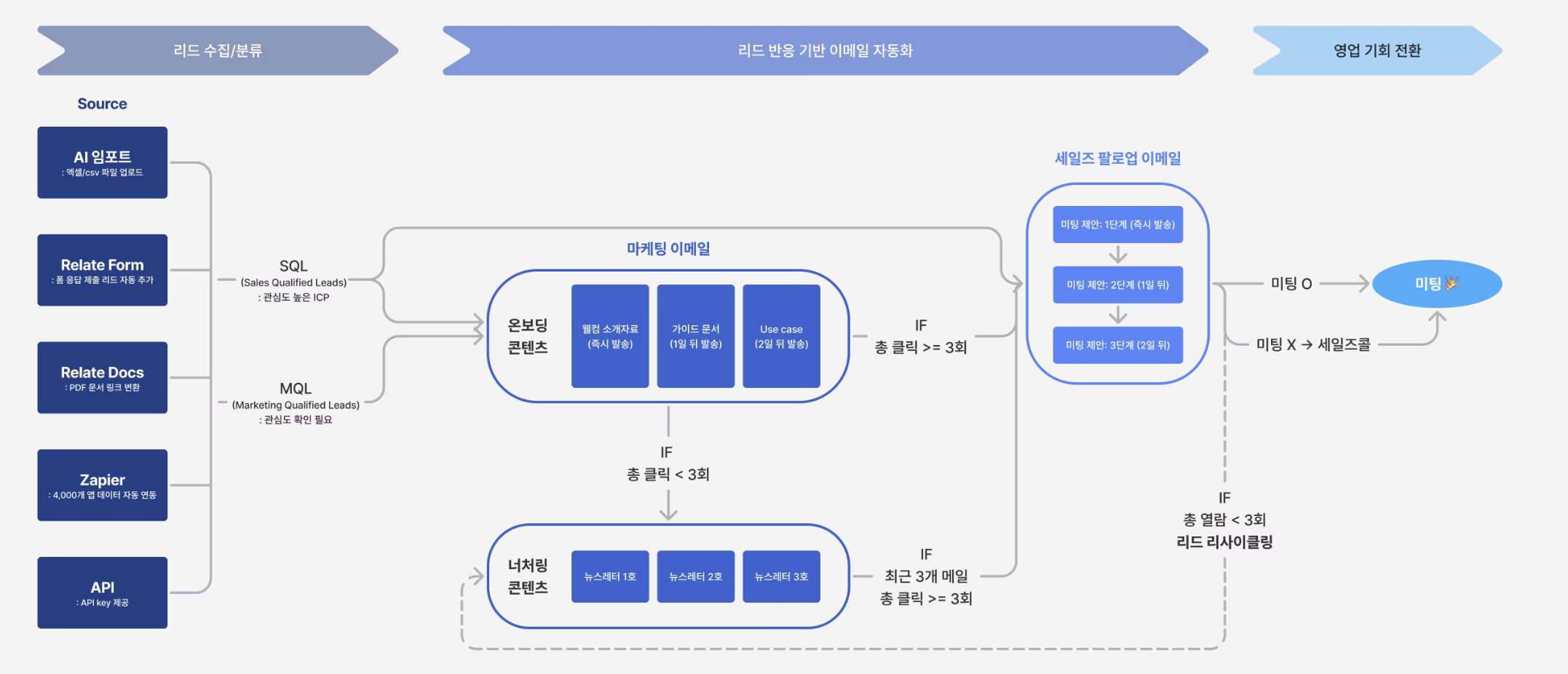
- Regardless of the channel, all leads are collected in one place and organized into lists.
-
Lead acquisition channels
Forms
Leads collected through forms can be automatically classified into lists based on their responses.
(e.g.) Response: “Interested in Product A” → Automatically classified into the Product A interest listFor detailed setup instructions, refer to the Forms guide.Documents
Leads can be collected through content-based actions such as downloading resources or viewing brochures. PDF files can be converted into shareable links, and through the Pulse feature, you can track whether a lead opened a document and which content they engaged with.For more details, refer to the Documents guide.Import
When you upload lead or customer data via CSV/Excel files, AI automatically extracts the data and creates lists. This is useful when you want to quickly build an initial lead list without manual work.For detailed usage instructions, refer to the Import data guide.Zapier
Spread can be easily integrated with external services via Zapier without writing any code. You can build automated workflows with tools such as Slack, Google Sheets, Notion, and CRMs by using triggers like new lead creation, list updates, or email send events.(e.g.) Google Sheets survey submission → Automatically added to a list in Spread
(e.g.) When a new lead is added in Spread → Send a notification to a Slack channelAPI
If more granular control or complex integrations are required, you can use the Spread Public API to connect lead data, lists, and email sending activities stored in Spread with external services.Through the API, you can control or automate key Spread features such as lead management automation, list synchronization, and email sending flows from external systems.If you want to build custom workflows using the API, please contact the Relate team at we@relate.so.
✅ SQL (Sales Qualified Lead)
: High-interest ICP
: High-interest ICP
- (e.g.) Imported data clearly meets ICP criteria such as industry or revenue size
- (e.g.) Explicitly expressed interest in a specific product via a form
- (e.g.) Clearly categorized acquisition source
- (e.g.) Repeatedly opened marketing emails
- (e.g.) Clicked internal links 3 or more times (criteria can be adjusted based on team settings)
✅ MQL (Marketing Qualified Lead)
: Lead requiring interest validation
: Lead requiring interest validation
- (e.g.) Opened marketing emails but did not click or reply
- (e.g.) Viewed only part of the content
- (e.g.) Participated in a webinar / event but with low engagement
- (e.g.) Responded intermittently to campaign emails
STEP 2. Connect email flows tailored to each lead segment
Email flows are automatically initiated based on each lead’s classification.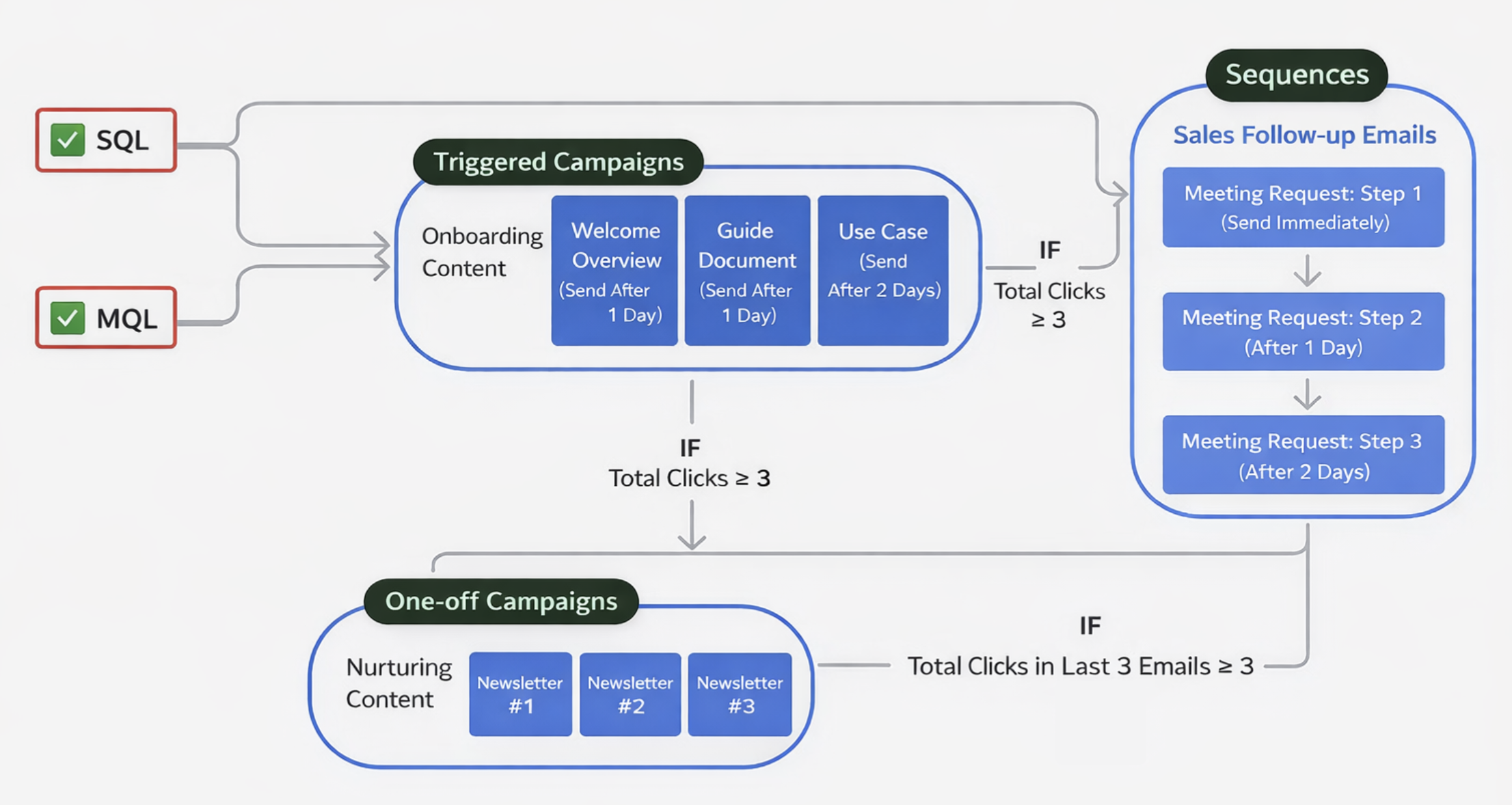
✅ SQL leads: A flow that directly leads to meetings
Leads classified as SQL already have sufficient confirmed interest and fit.For these leads, a sales-focused follow-up sequence flow is immediately connected.
- Meeting proposal message
- Follow-up reminder emails
- Sent step by step until a meeting is scheduled
- The sending timing of each step can be freely adjusted in the settings
As a result, a flow is created that naturally leads to meetings before interest fades.
✅ MQL leads: A flow to validate and nurture interest
Leads classified as MQL are not yet ready for an immediate meeting proposal.For these leads, a marketing email flow is connected to validate and nurture interest.
First, an triggered campaign that includes onboarding content is sent to continuously track lead responses. Lead status is re-evaluated based on predefined criteria.
For example, when the cumulative number of clicks reaches a predefined threshold, the lead is automatically converted to SQL. (Thresholds can be adjusted based on user settings.)
- When criteria are met: the lead is converted to SQL, and a sales follow-up email flow begins.
- When criteria are not met: nurturing is continuously carried out through one-off campaigns (such as newsletters).
In other words, Spread | Emma automatically selects the sending method based on lead status.
- Stage to validate responses → Triggered campaigns (onboarding content)
- Leads that need interest nurturing → One-off Campaigns (nurturing content, newsletters, etc.)
- Leads ready for meeting-level conversations → Sequences (sales follow-up)
Emma’s AI Writer creates email drafts aimed at meeting conversion based on the lead’s activity and context. These emails are not simple templates, but are written using AI descriptions that incorporate basic information about your company and the lead.
STEP 3. Decide the next step based on lead email responses
Spread | Emma does not treat email responses as simple performance metrics. The responses themselves become the criteria for determining the next action.(1) Email responses are automatically collected and organized at the lead level
Emma automatically records all responses to one-off campaign, triggered campaign, and sequence emails. These responses are aggregated and organized per lead, not per individual email.(2) Collected responses become decision signals
- One-off Campaign / Triggered campaign responses: Email opens, link clicks, unsubscribes
- Sequence responses: Replies
(3) Post-email behavior is also taken into account
Email opens, clicks, and replies alone are not always sufficient to fully understand lead interest.Emma tracks post-email behavior through Pulse.
(4) New lists are created based on response results
In Emma, there are Destination lists that automatically move only leads that meet specific conditions based on collected email responses. For example, destination lists can be created based on the following criteria:- Leads with repeated clicks in the most recent triggered campaign
- Leads that directly replied to sequences
- Leads that clicked a specific content link more than a certain number of times
- Leads with confirmed meeting schedules
- Leads that completed specific actions via API integration (e.g., sign-up)
- Leads with little to no email or content engagement
(5) These lists become the starting point for the next flow
- Immediately lead to meeting proposals, or
- Become the starting point for the next email sending flow, or
- Lead into nurturing flows for lead recycling
STEP 4. Lead recycling
Lead lists segmented by responses are not the end of automation, but a new starting point that determines the next flow.Emma does not discard leads or stop automation simply because there was no response once. All leads are continuously re-evaluated based on responses and managed so they can move to the next stage at the appropriate time.