> ## Documentation Index
> Fetch the complete documentation index at: https://www.spread.so/docs/llms.txt
> Use this file to discover all available pages before exploring further.
# How It Works
> Learn how Emma in Spread converts leads into sales opportunities, step by step.
## Overview
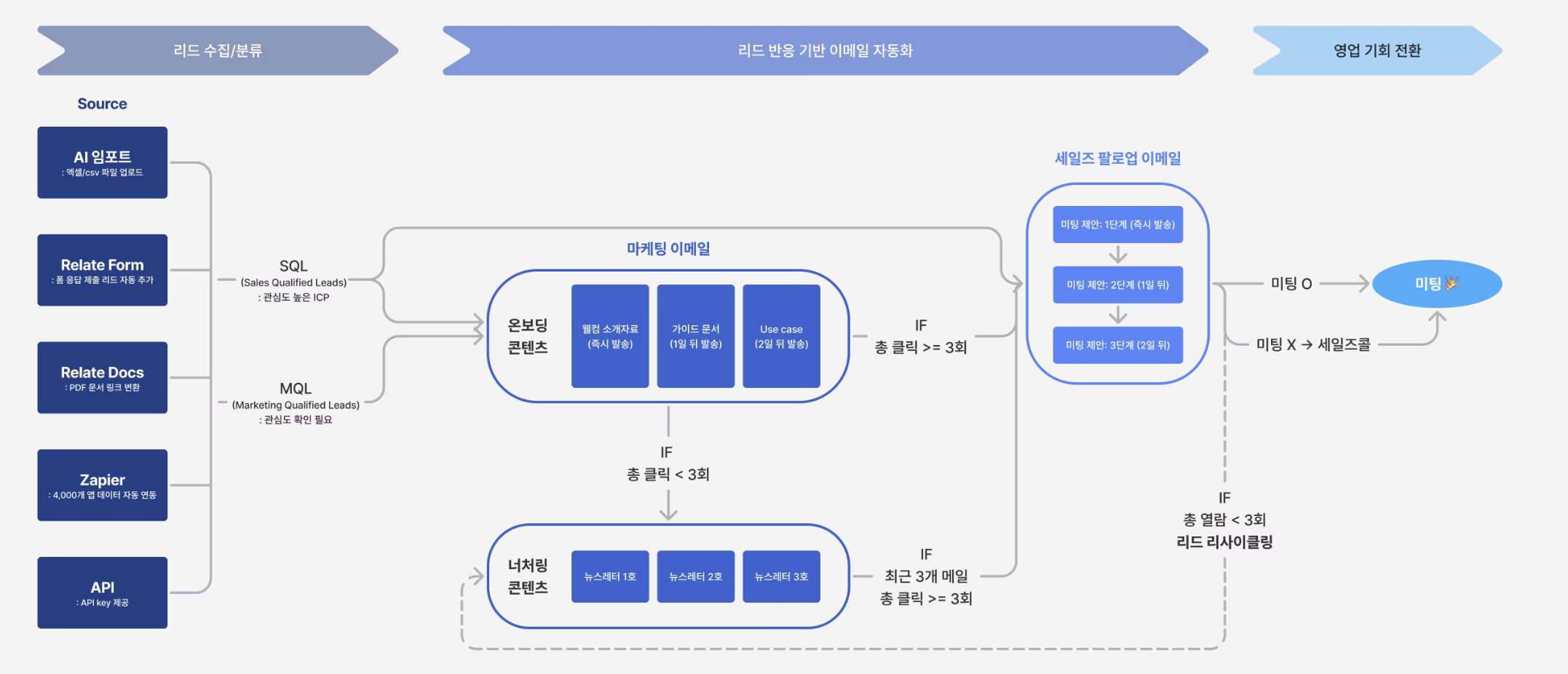 ## STEP 1. Classify incoming leads
* Regardless of the channel, all leads are collected in one place and organized into lists.
* Lead acquisition channels
Leads collected through forms can be automatically classified into lists based on their responses.\
(e.g.) Response: “Interested in Product A” → Automatically classified into the Product A interest list
For detailed setup instructions, refer to the [Forms](/docs/forms) guide.
Leads can be collected through content-based actions such as downloading resources or viewing brochures.
PDF files can be converted into shareable links, and
through the [Pulse](/docs/pulse) feature, you can track whether a lead opened a document and which content they engaged with.
For more details, refer to the [Documents](/docs/docs) guide.
When you upload lead or customer data via CSV/Excel files, AI automatically extracts the data and creates lists.
This is useful when you want to quickly build an initial lead list without manual work.
For detailed usage instructions, refer to the [Import data](/docs/import/ai-import) guide.
Spread can be easily integrated with external services via Zapier without writing any code.
You can build automated workflows with tools such as Slack, Google Sheets, Notion, and CRMs by using triggers like new lead creation, list updates, or email send events.
(e.g.) Google Sheets survey submission → Automatically added to a list in Spread\
(e.g.) When a new lead is added in Spread → Send a notification to a Slack channel
If more granular control or complex integrations are required, you can use the Spread Public API to connect lead data, lists, and email sending activities stored in Spread with external services.
Through the API, you can control or automate key Spread features such as lead management automation, list synchronization, and email sending flows from external systems.
If you want to build custom workflows using the API, please contact the Relate team at [we@relate.so](mailto:we@relate.so).
Leads are automatically classified into the following two states based on engagement level and responses, and subsequent email flows are determined according to each classification.
## STEP 1. Classify incoming leads
* Regardless of the channel, all leads are collected in one place and organized into lists.
* Lead acquisition channels
Leads collected through forms can be automatically classified into lists based on their responses.\
(e.g.) Response: “Interested in Product A” → Automatically classified into the Product A interest list
For detailed setup instructions, refer to the [Forms](/docs/forms) guide.
Leads can be collected through content-based actions such as downloading resources or viewing brochures.
PDF files can be converted into shareable links, and
through the [Pulse](/docs/pulse) feature, you can track whether a lead opened a document and which content they engaged with.
For more details, refer to the [Documents](/docs/docs) guide.
When you upload lead or customer data via CSV/Excel files, AI automatically extracts the data and creates lists.
This is useful when you want to quickly build an initial lead list without manual work.
For detailed usage instructions, refer to the [Import data](/docs/import/ai-import) guide.
Spread can be easily integrated with external services via Zapier without writing any code.
You can build automated workflows with tools such as Slack, Google Sheets, Notion, and CRMs by using triggers like new lead creation, list updates, or email send events.
(e.g.) Google Sheets survey submission → Automatically added to a list in Spread\
(e.g.) When a new lead is added in Spread → Send a notification to a Slack channel
If more granular control or complex integrations are required, you can use the Spread Public API to connect lead data, lists, and email sending activities stored in Spread with external services.
Through the API, you can control or automate key Spread features such as lead management automation, list synchronization, and email sending flows from external systems.
If you want to build custom workflows using the API, please contact the Relate team at [we@relate.so](mailto:we@relate.so).
Leads are automatically classified into the following two states based on engagement level and responses, and subsequent email flows are determined according to each classification.
✅ **SQL** (Sales Qualified Lead)\
: High-interest ICP
* (e.g.) Imported data clearly meets ICP criteria such as industry or revenue size
* (e.g.) Explicitly expressed interest in a specific product via a form
* (e.g.) Clearly categorized acquisition source
* (e.g.) Repeatedly opened marketing emails
* (e.g.) Clicked internal links 3 or more times *(criteria can be adjusted based on team settings)*
✅ **MQL** (Marketing Qualified Lead)\
: Lead requiring interest validation
* (e.g.) Opened marketing emails but did not click or reply
* (e.g.) Viewed only part of the content
* (e.g.) Participated in a webinar / event but with low engagement
* (e.g.) Responded intermittently to campaign emails
## STEP 2. Connect email flows tailored to each lead segment
Email flows are automatically initiated based on each lead’s classification.
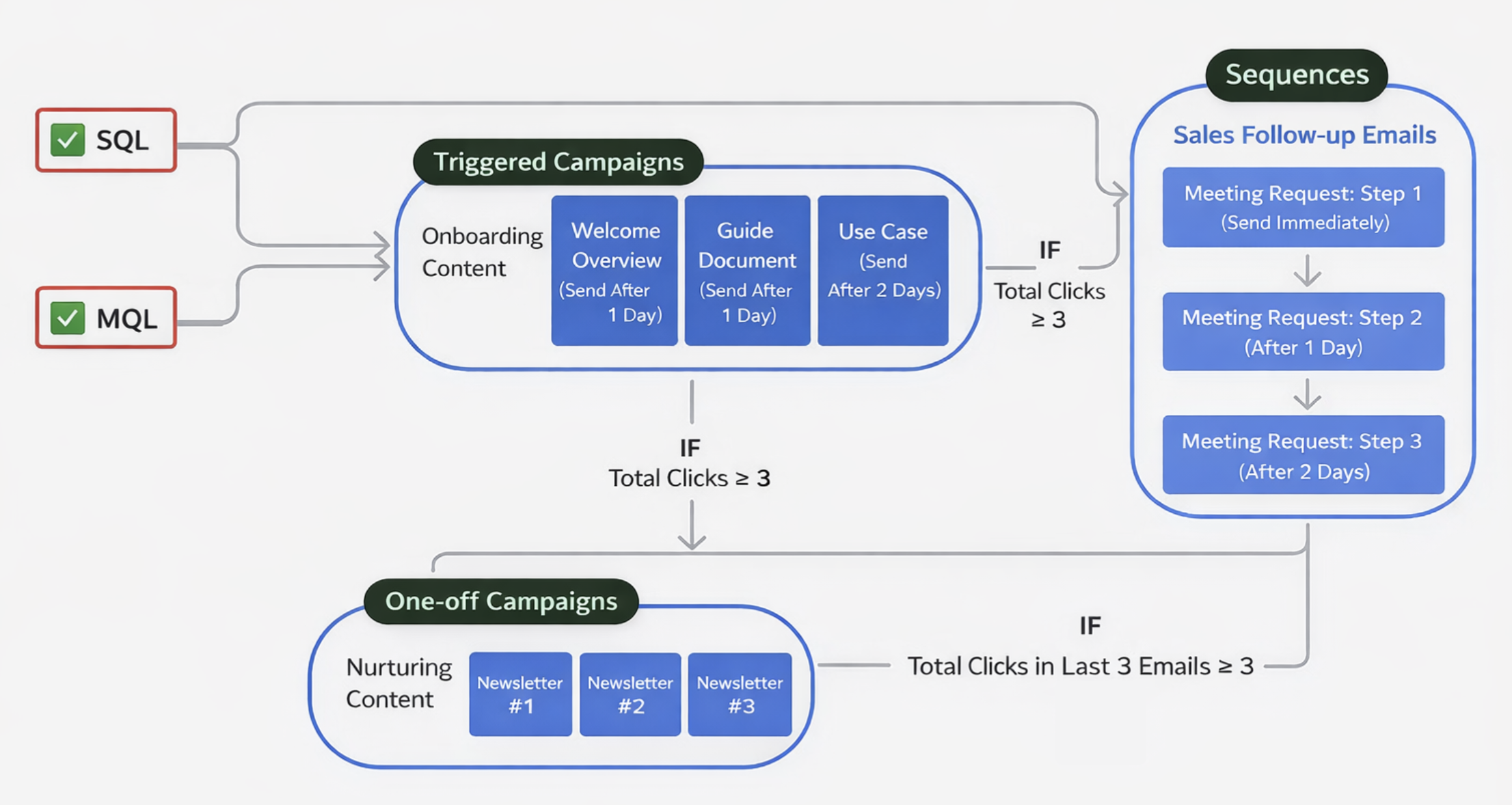 ### ✅ SQL leads: A flow that directly leads to meetings
Leads classified as SQL already have sufficient confirmed interest and fit.\
For these leads, a **sales-focused follow-up** [**sequence**](/docs/emma-features#emma-sequence) flow is immediately connected.
### ✅ SQL leads: A flow that directly leads to meetings
Leads classified as SQL already have sufficient confirmed interest and fit.\
For these leads, a **sales-focused follow-up** [**sequence**](/docs/emma-features#emma-sequence) flow is immediately connected.
* **Meeting proposal message**
* **Follow-up reminder emails**
* Sent step by step until a meeting is scheduled
* The sending timing of each step can be freely adjusted in the settings
At the same time, **onboarding content** (triggered campaigns) is also delivered so that the lead can understand the context before the meeting.\
As a result, a flow is created that naturally leads to meetings before interest fades.
### ✅ MQL leads: A flow to validate and nurture interest
Leads classified as MQL are not yet ready for an immediate meeting proposal.\
For these leads, a **marketing email** flow is connected to validate and nurture interest.
First, an [**triggered campaign**](/docs/emma-features#2-triggered-campaign) that includes **onboarding content** is sent to continuously track lead responses. Lead status is re-evaluated based on predefined criteria.
- When criteria are met: the lead is **converted to SQL**, and a **sales follow-up email** flow begins.
- When criteria are not met: **nurturing** is continuously carried out through [one-off campaigns](/docs/spread-email-types#one-off-campaigns) (such as newsletters).
## STEP 3. Decide the next step based on lead email responses
Spread | Emma does not treat email responses as simple performance metrics. The responses themselves become the criteria for determining the next action.
### (1) Email responses are automatically collected and organized at the lead level
Emma automatically records all responses to one-off campaign, triggered campaign, and sequence emails. These responses are aggregated and organized per lead, not per individual email.
### (2) Collected responses become decision signals
* **One-off Campaign / Triggered campaign responses**: Email opens, link clicks, unsubscribes
* **Sequence responses**: Replies
These responses become the core data used to determine how much interest a lead has.
### (3) Post-email behavior is also taken into account
Email opens, clicks, and replies alone are not always sufficient to fully understand lead interest.\
Emma tracks post-email behavior through [**Pulse**](/docs/pulse).
**Pulse**
* You can check who opened a document, how far they read, and which content they stayed on using Pulse.
* This information is used as a stronger signal to identify what each lead is genuinely interested in.
### (4) New lists are created based on response results
In Emma, there are [**Destination lists**](/docs/emma-features#spread-|-emma-자동화의-기본-세트) that automatically move only leads that meet specific conditions based on collected email responses.
For example, destination lists can be created based on the following criteria:
* Leads with repeated clicks in the most recent triggered campaign
* Leads that directly replied to sequences
* Leads that clicked a specific content link more than a certain number of times
* Leads with confirmed meeting schedules
* Leads that completed specific actions via API integration (e.g., sign-up)
* Leads with little to no email or content engagement
### (5) These lists become the starting point for the next flow
* Immediately lead to meeting proposals, or
* Become the starting point for the next email sending flow, or
* **Lead into nurturing flows for lead recycling**
## STEP 4. Lead recycling
Lead lists segmented by responses are not the end of automation, but **a new starting point that determines the next flow**.\
Emma does not discard leads or stop automation simply because there was no response once.
All leads are continuously re-evaluated based on responses and managed so they can move to the next stage at the appropriate time.