> ## Documentation Index
> Fetch the complete documentation index at: https://www.spread.so/docs/llms.txt
> Use this file to discover all available pages before exploring further.

# Share an Email as a Web Link

> Learn how to share a sent email as a web page link.

## Overview

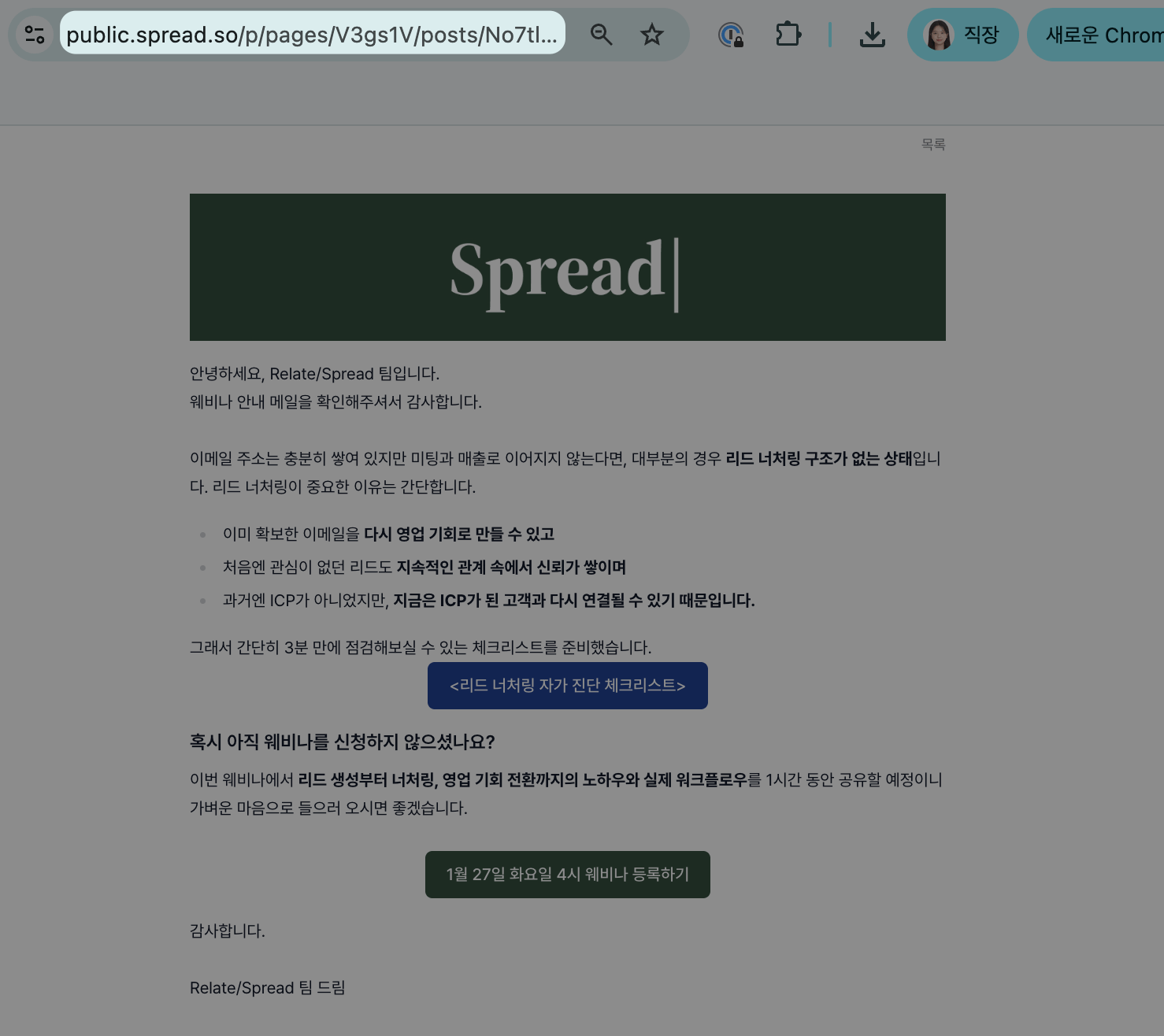
You can publish a sent campaign or triggered campaign as a web link and share it externally. Even people who didn't actually receive the email can view the same content in their browser using just the link.
Use it in many ways — Slack, messengers, Notion, documents, customer-facing materials, and more.

<div style={{ display: "flex", justifyContent: "center", marginTop: "10px" }}>
  <img src="https://mintcdn.com/relate-fa98d7d/wfR1Uu0tzQDxNIxj/images/email_link/Cms.png?fit=max&auto=format&n=wfR1Uu0tzQDxNIxj&q=85&s=ee534e901d621427b6bf7559bf91932d" alt="Web link share screen 3" style={{ width: "100%", maxWidth: "900px", height: "auto", boxShadow: "0 12px 30px rgba(0, 0, 0, 0.18)", borderRadius: "8px" }} width="1478" height="1316" data-path="images/email_link/Cms.png" />
</div>

<br />

## How to create a share link

### (1) Creating a share link from a campaign

<div style={{ display: "flex", justifyContent: "center", marginTop: "10px" }}>
  <img src="https://mintcdn.com/relate-fa98d7d/wfR1Uu0tzQDxNIxj/images/email_link/makelink_cp.png?fit=max&auto=format&n=wfR1Uu0tzQDxNIxj&q=85&s=edf75833a51e34f37599833babdc0147" alt="Web link share screen 2" style={{ width: "100%", maxWidth: "900px", height: "auto", boxShadow: "0 12px 30px rgba(0, 0, 0, 0.18)", borderRadius: "8px" }} width="2502" height="1478" data-path="images/email_link/makelink_cp.png" />
</div>

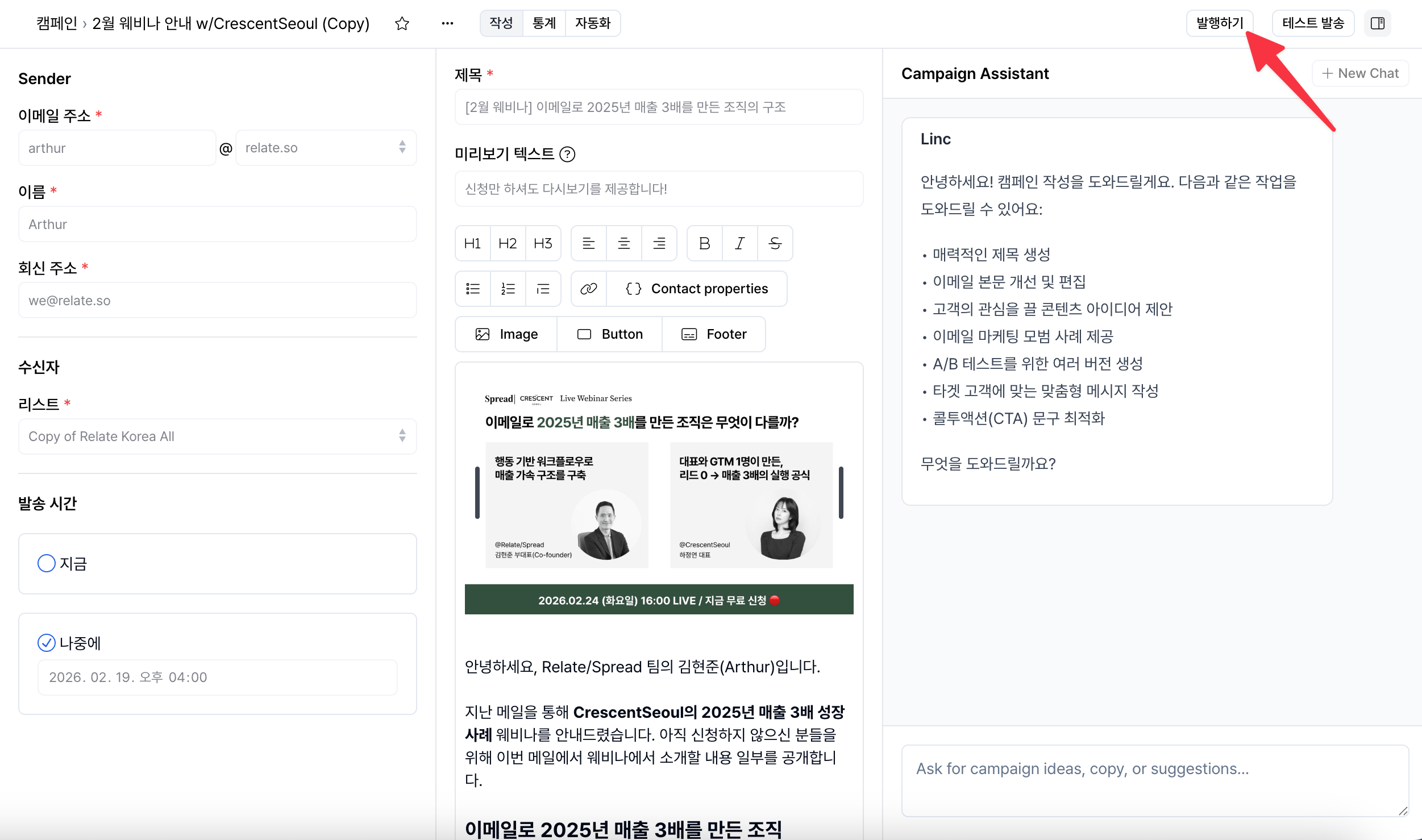
1. Go to the detail page of a campaign that has finished sending.
2. Click the `Publish` button in the top-right corner.
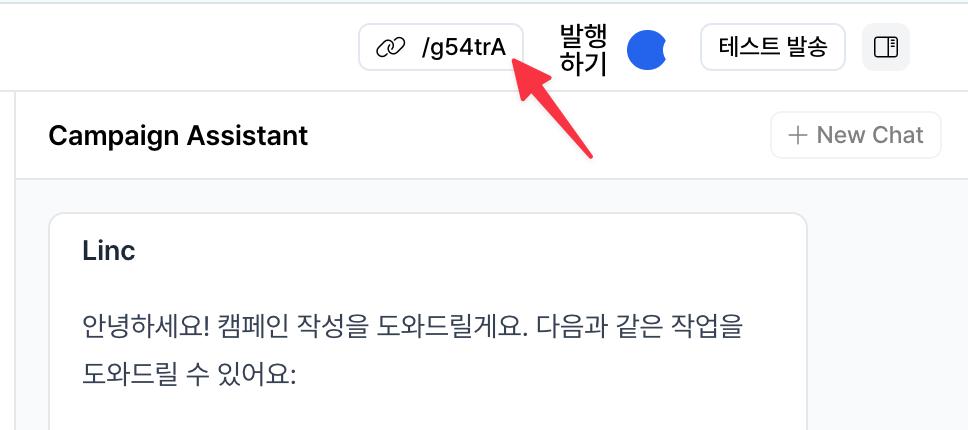
3. Copy the newly created web link in the top-right corner and share it.

<div style={{ display: "flex", justifyContent: "center", marginTop: "10px", marginBottom: "10px" }}>
  <img src="https://mintcdn.com/relate-fa98d7d/wfR1Uu0tzQDxNIxj/images/email_link/clicklink.png?fit=max&auto=format&n=wfR1Uu0tzQDxNIxj&q=85&s=4b555d6c104563a6d8cac3669a241c1e" alt="Web link click screen" style={{ width: "60%", height: "auto", boxShadow: "0 12px 30px rgba(0, 0, 0, 0.18)", borderRadius: "8px" }} width="968" height="430" data-path="images/email_link/clicklink.png" />
</div>

<div style={{ height: "8px" }} />

### (2) Creating a share link from a triggered campaign

<div style={{ display: "flex", justifyContent: "center", marginTop: "6px" }}>
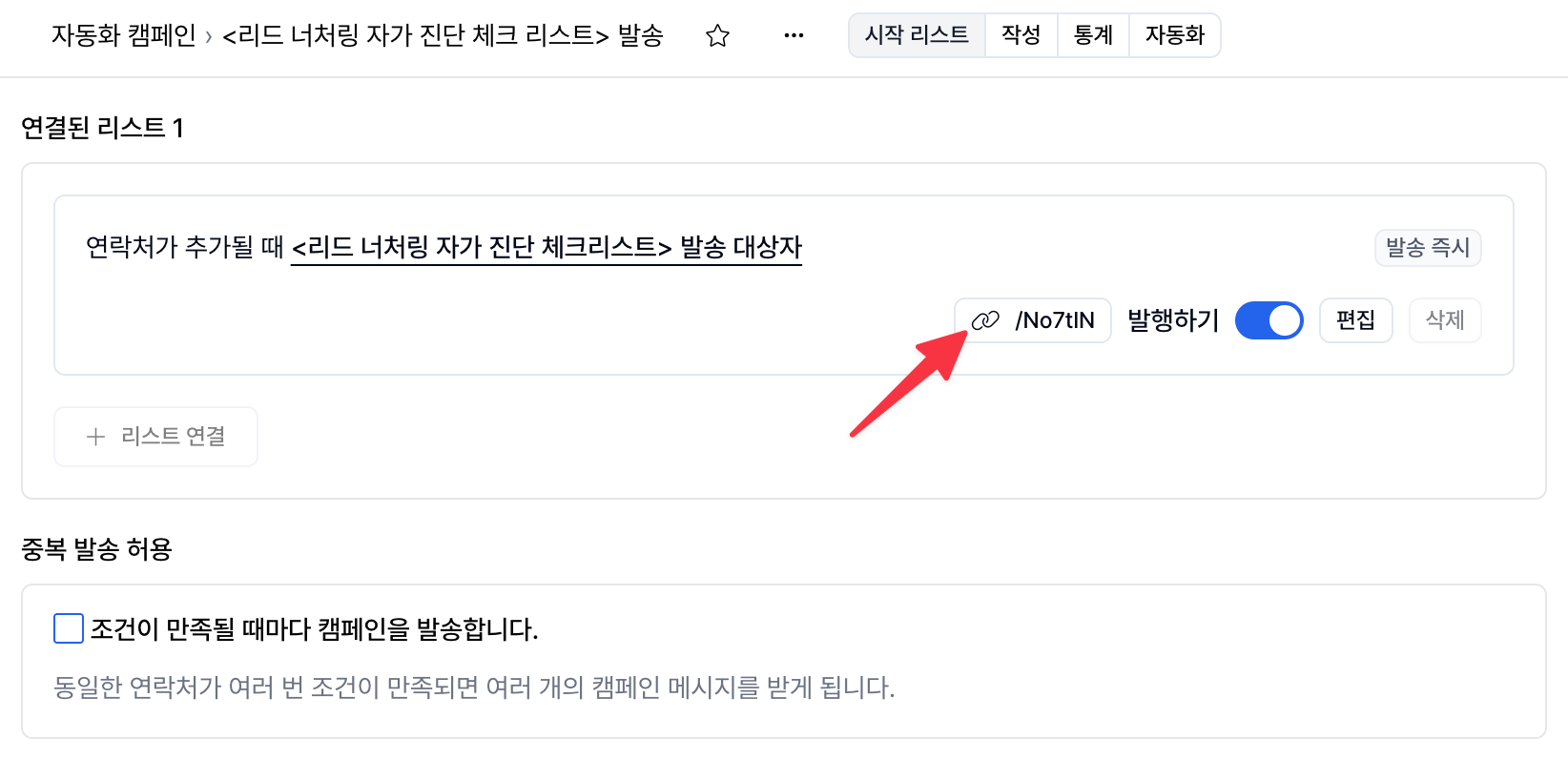
  <img src="https://mintcdn.com/relate-fa98d7d/wfR1Uu0tzQDxNIxj/images/email_link/makelink.png?fit=max&auto=format&n=wfR1Uu0tzQDxNIxj&q=85&s=870bfe655be7ffd114b295d18ee7513e" alt="Web link share screen 1" style={{ width: "100%", maxWidth: "900px", height: "auto", boxShadow: "0 12px 30px rgba(0, 0, 0, 0.18)", borderRadius: "8px" }} width="1590" height="844" data-path="images/email_link/makelink.png" />
</div>

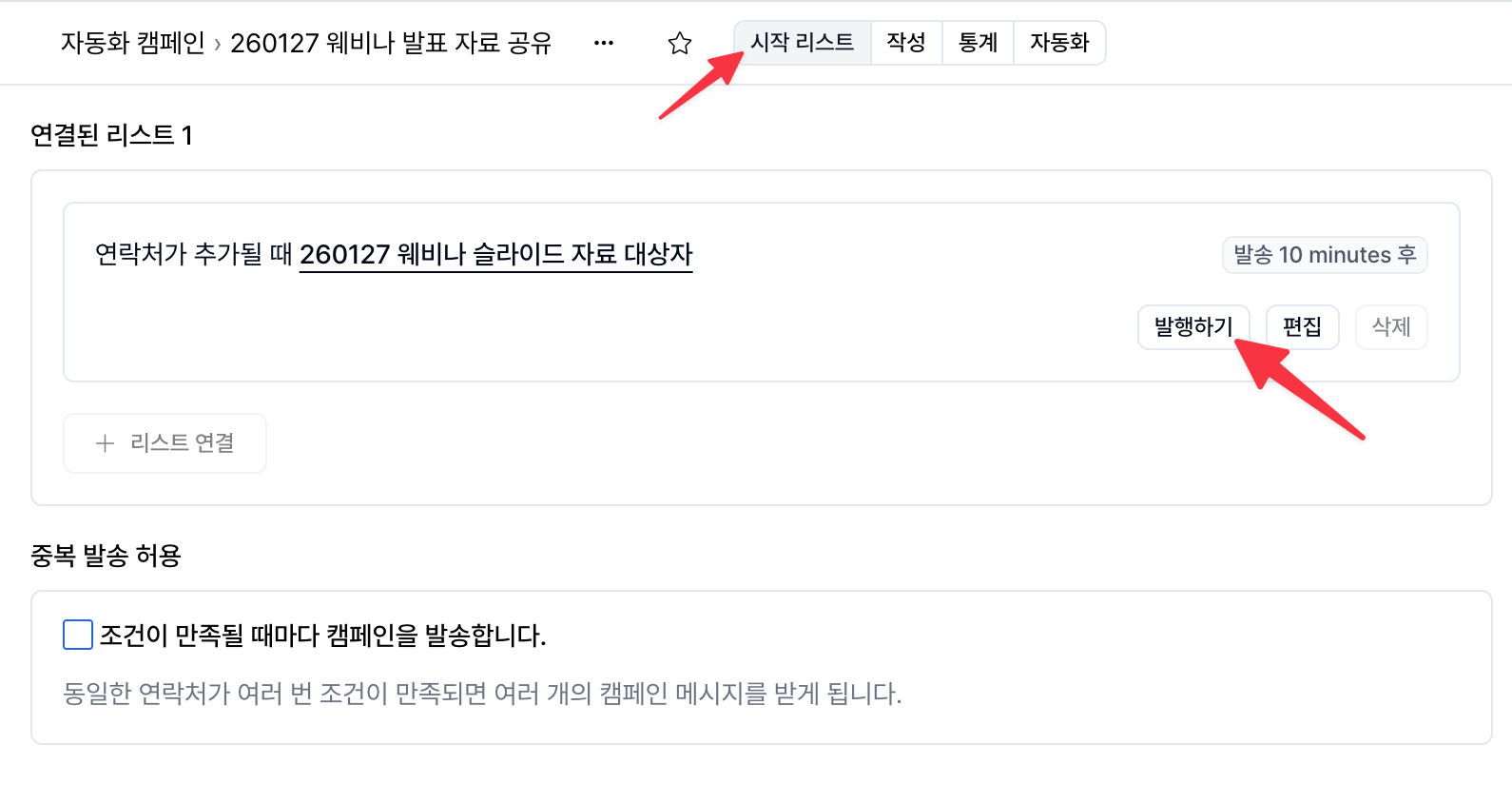
1. Go to the detail page of a triggered campaign that has finished sending.
2. In the `Source lists` tab at the top, click the `Publish` button.
3. Copy the web link created next to the `Publish` button and share it.

<div style={{ display: "flex", justifyContent: "center", marginTop: "10px", marginBottom: "10px" }}>
  <img src="https://mintcdn.com/relate-fa98d7d/wfR1Uu0tzQDxNIxj/images/email_link/clicklink_tc.png?fit=max&auto=format&n=wfR1Uu0tzQDxNIxj&q=85&s=9a3a1e58f1fad552154d2e1aaec23c1b" alt="Web link click screen" style={{ width: "80%", height: "auto", boxShadow: "0 12px 30px rgba(0, 0, 0, 0.18)", borderRadius: "8px" }} width="1644" height="818" data-path="images/email_link/clicklink_tc.png" />
</div>

<br />

## Conditions for creating a share link

* A web link can only be created for **campaigns / triggered campaigns that have finished sending.**
* The `Publish` button is not shown for drafts (in progress). In other words, you can only create a web link after sending.
* If you want to share a draft, you can do so as follows:
  * Copy the page URL from the browser's address bar and share it directly.
  * Only team members with access to that workspace can view it.
  * Drafts cannot be shared with external users.

<br />

## Coming soon

In the future, we plan to provide a page where you can view all published emails in one place, along with a feature that lets visitors who enter their email on that page be added directly to a subscriber list.